
Introduction to the HMS
The health Management System (HMS) is resposible for the monitoring and alerting of the printing system which includes:
- Hardware connections (How the system is connected)
- Issues with the physical hardware (Fans, Hotend, Heatbed)
- Motion system (Belts, rods)
- Printing issues picked up by AI (First Layer Scanning and Spagetti Detection)
If an abnormal status is detected the HMS will alert the user to the issue and if required, provide a QR Code to further information from the Bambu Labs Wiki
HMS Code Definition
Below is the HMS Numbering convention
 Module ID
| Module ID | Module Abbreviation | Module Name |
| 03 | MC | Motion Controller |
| 05 | AP | Main Board |
| 07 | AMS | Automated Material System |
| 08 | TH | Tool Head |
| 0C | XCAM | Bambu Micro Lidar |
| 10 | Studio | Studio |
| 11 | APP | APP |
Module Number
The number for the module, Normally this will be a zero in most cases, but if could be a different number if there are multiple modules connected, like two AMS
Part ID
The part ID for the Module.
Part Number
The number of the part in the specifig module
Alert Level
| Level | Definition |
| 0000 | Invalid alert |
| 0001 | Error (Printing task stopped, alert must be eliminated before starting a task) |
| 0002 | Warning (Printing task pause, alert must be eliminated before resuming the task) |
| 0003 | Info (Information only ) |
Error Code ID
The ID of the HMS Alert
HMS Workflow
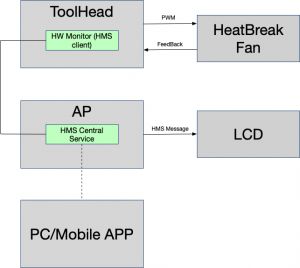
HMS is a distributed system which includes many status detectors and a central management unit. The below is a simple diagram to show how it works.
Error Code
For each alert the HMS dispays a unique error code for it. For example, if there is an error with the heatbed temperature the code is 03000100010001. This error code can be searched on the Bambu Lab WIKI
Notification
If the HMS detects that something is wrong in the system, it will pop up a error message along with the error code on the screen. The notification method for each message is different, based on the level of severity. For fatal errors, it will pop up a message window on the machine's display and request user confirmation. For warning statuses, the HMS will just show a notification message on the right of the display screen. The HMS will also send a notification message to the mobile app.
Limitations
There are also some limitations for the HMS, for example:
- The HMS can not cover all the error/warning statuses due to the fact that it lacks some evaluation methods.
- Some errors can not be identified directly such as lost steps.
- The root cause for some errors is very complicated and the HMS can not identify the real reason for them. For example, a clog may be caused by improper print settings or improper operation. The HMS may only detect that an error occurred but won't know the real reason.
Using the HMS
Users can utilize the notifications of the HMS to know the status of the whole system including some mechanical and hardware errors, or why the printing has failed. There is a wiki page that gives a detailed description and a how-to for each error code which can be found here. While reporting errors, the HMS also gives a QR code which leads to the wiki page. So when seeing a HMS message, users should read the related wiki page carefully and follow the diagnostics steps to identify what the real problem is.
If you can not resolve the problem yourself, you can ask for after sale service from Bambu Lab.